New project: Yalaloop

April 3rd, 2026

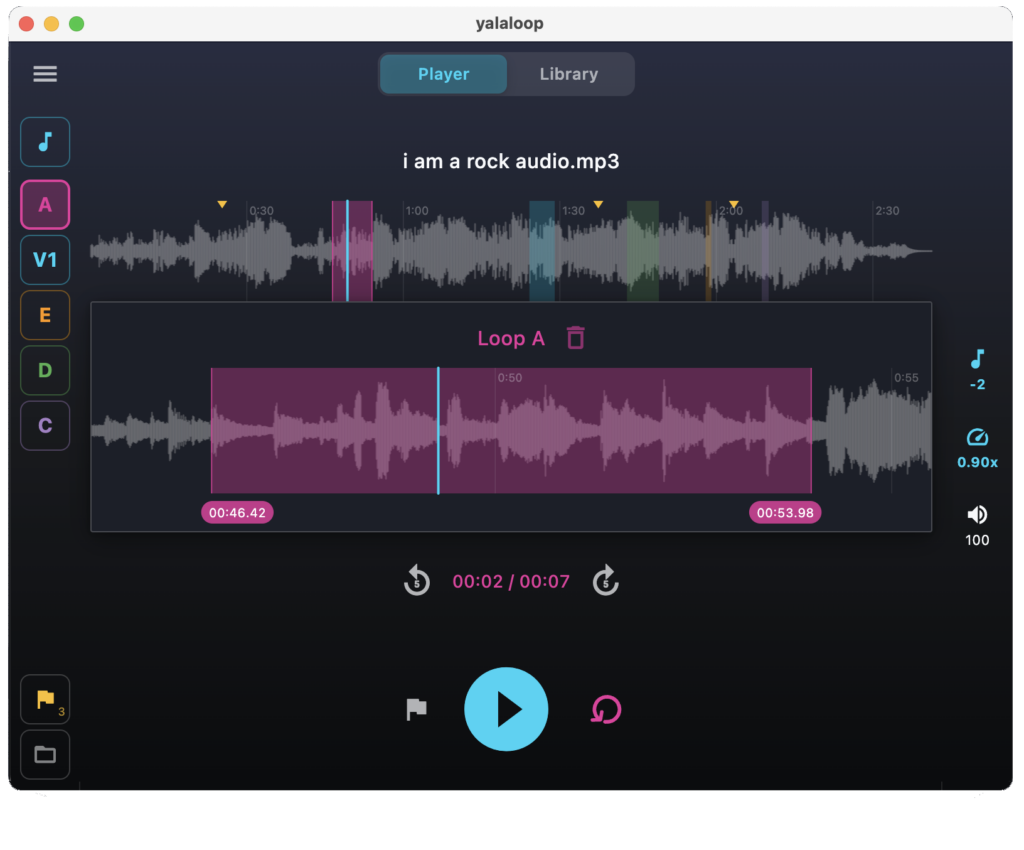
As an experiment to use Claude code I’m working on a new project: YalaLoop. It’s a cross-platform audio player that allow you to loop sections, slow them down and change pitch. It’s built with flutter and should go into the app stores soon.

Experience with Claude Code so far

Working with Claude code has been both great and frustrating at the same time. Some key points:

  • Run it inside a container
  • If it doesn’t get it right after the third attempt it’s better to abandon and figure things out yourself.
  • You need to actively ask it to do better and refactor to keep things manageable
  • It’s great at tedious stuff like making C libraries work with Flutter
  • It tends to try to solve the symptoms instead of the root causes, often adding all kind of state flags instead of a general solution.

Experience with Gemini + Aider

While waiting for my Claude code limits to refresh I also tried Gemini with Aider. The advantage is that it’s fast, but it’s really over-eager by default. It helps putting it in --chat-mode=ask. However Gemini is still too over-eager in changing things up. What I did find it useful for is proposing refactoring ideas, that I then let Claude code execute.

10 common Google Ads mistakes by business owners

December 10th, 2017

A few months ago I decided to get back into experimenting in Google Ads advertising for both my day job and Observu website monitoring. I quickly learned that Google Ads is very good at letting you pay for low value traffic and making you believe you are doing a good job.

1. Mistake clicks for success

Clicks are traffic to your site and this can only be a good thing, right? Yes, if you weren’t paying through the nose for it. If you are paying EUR 2,00 for a visitor that spends 5 seconds on your site and then hits the back button that is just throwing away money.

To start, you need to monitor conversions (pretty much everyone uses Google tag manager to set it up) such as submitting your registration form, buying a product, etc.

Make sure to add the ‘number of conversion’ column to all your Google Ads reports so you can see which clicks get you conversions

2. Not check actual search terms regularly

Another way to see the value of your traffic is to religiously check the actual search terms visitors used before they clicked your ad. You may think you are getting clicks for interesting keywords, but Google may be fooling you with their reports. e.g. I advertise on a broad matching keyword: website monitoring. What Ads sends me traffic for, is someone that searched for: compare monitors online. It’s highly unlikely that this is someone interested in my product.

To deal with this you can either change a broad matching keyword to a more narrow match or add it as a negative keyword.

3. Pay for irrelevant traffic

This is a refinement on point 2. If you watch it closely you will notice that Google Ads will send you traffic on people search for URLs .e.g. queries like: http www somewebsite com your keyword Often it’s very unlikely to be relevant, I therefore suggest to add the following negative keywords to every campaign that is not your own brand campaign:

+http
+www
+https

4. Overpaying for mobile clicks

In my experience there is far less value in mobile clicks, because on mobile Ads look even more like search results and people are very quick to (maybe accidentally) hit the first result they see. I therefore urge you too adjust your bid for mobile devices with 50% to 90%.

5. Use automated / enhanced bidding

Although these options sound great, what I’ve seen in practice is that Google Ads most of the time just raises your bids to the maximum CPC you’ve set. With manual bidding you have much better control over what you are willing to pay. I suggest adding the [top of page] column to your keyword reports to select a proper price to bid.

6. Combine multiple keywords in a single ad group

An important factor in how well your ads are displayed is the Quality score. One part of this quality score is that your Ad text matches your keyword. Now when I first used Adwords I assumed that Google would match my keyword to the most fitting Ad I had in the group. This does not seem the case. Adwords converges to the best performing Ad in a group, independent of how well it matches the current keyword. Therefor the only way to force a relevant ad, is to make sure a group has a very narrow scope in keywords and use the keyword in the ad text. By doing so, the quality score will improve and the display likeliness and position of your ad will improve.

Further improvement can be made by creating a landing page for the ad group and making it highly relevant to your keyword.

7. Adding broad matching keywords

As I already mentioned at point 2. and 3. if you use broad matching keywords, Google takes a lot of liberty to show your ads. Now this has it’s advantages, such as also matching searches for competing products. But it also triggers a lot of irrelevant traffic. It is therefore strongly suggested to only use broad matching keywords to discover more specific relevant keywords. In my case, instead of just using: website monitoring I use:

+website +monitoring
"website monitoring"
[website monitoring]

Phrase match (second item) is the closest to what you would normally expect Google to do. Using all three variations allow to bid more for people searching for the exact keyword.

8. Forget checking the quality of conversions

If you followed the recommendation to track conversions, it’s easy to assume every conversion has a value. That’s not the case. e.g. if someone fills out my signup form, but never confirms their e-mail, is there any value? What if they sign up, but then contact support and you figure out they intended to do something else. (e.g. sign up for a different product with a similar name)

Ideally your signup/buy process should capture the adwords campaign it originated from (e.g. using the __utmz cookie) so you can identify which campaigns result in these bogus conversions.

9. Mixing low and high cost keywords in a single campaign

One of the struggles with Google Ads is getting to a CPC that is low enough so it works for your business. Once you found some low cost, high volume keywords they can provide a steady stream of traffic. Some keywords may be more relevant and you are willing to pay more for it, that’s fine. However, if you combine these two in one campaign under a single budget, this means that that one EUR 3 click, just cost you the 10 30 cent clicks you would normally have.

10. Not using a dedicated campaign for your brand name

If you need to advertise on your own brand name (e.g. a competitor is stealing your clicks by advertising on it). You need to do so in a separate campaign. First, someone searching for your brand has very different characteristics, this will skew your conversion metrics. Second, this is easy, highly relevant traffic, you don’t want to miss out on this because you ran out of budget due to other keywords.

I’m by no means an expert, but just checking your account regularly for these mistakes can drastically increase the value you get from your Google Ads budget.
Testing User Sessions with Flask Elegantly

August 17th, 2017

There is excellent information available on testing Flask e.g. http://flask.pocoo.org/docs/0.12/testing/

One thing I ran into was the need to set up a user session for most of my test cases.
The documentation suggests something like:

with app.test_client() as c:
    with c.session_transaction() as sess:
        sess['a_key'] = 'a value'

but repeating that in every test case (especially with a bit more code to set up the session) is not really DRY.

Now the same documentation suggests a very elegant trick using context managers for setting up users on the global object:

from contextlib import contextmanager
from flask import appcontext_pushed, g

@contextmanager
def user_set(app, user):
    def handler(sender, **kwargs):
        g.user = user
    with appcontext_pushed.connected_to(handler, app):
        yield

Inspired by this, I figured that they can be combined into:

@contextmanager
def user_set(app, user):
   with app.test_client() as c:
       with c.session_transaction() as sess:
           start_user_session(sess, user)
       yield c


and then use it in a test like:

user = ...
with user_set(app, user) as client:
    client.get('/logged_in_resource')

Getting Yourself Unstuck When Programming

July 17th, 2017

Everyone who has ever coded anything significant  (and probably everyone who has ever done anything that requires creativity) will recognise the problem of getting stuck. Most of the time it is caused by lack of information or confidence to move forward. Over time I’ve identified a number of reasons I get stuck and also strategies to deal with this.

Perceived Dependencies

In larger systems, components often have to interact. If none of these components are properly defined or all need changes, it can be hard to get started.
Strategy: Fake a little, build a little.
It’s tempting to start things from the beginning and just write the code sequentially, however if things are not entirely clear it can work very well to start at a very very high level.
I usually just outline everything in 3 to four steps, each being a commented line. For example if I need to classify emails into categories, I might write something like:


// get e-mails
// get defined categories
// classify e-mails

Then write each step as code. This is the time you will need to start thinking about how data is passed around. Whether you will need objects or just lists of strings, etc.


// get e-mails
emails = get_emails()
// get defined categories
categories = get_categories()
// classify e-mails
classifier = new Classifier(categories)
for email in emails:
    scores = classifier.get_score(email)
    category = get_top_category(scores)
    print email.title, category

To test these assumptions you will need to actually implement the functions/components you’ve used. However, key to this strategy is to now fake these functions/components as much as possible.
e.g. I may implement get_top_category as:


def get_top_category(scores):
    return scores.keys()[0]

The reason to do this is not because I don’t know yet how to implement this, but because I don’t want to get stuck in details. (e.g. what happens if there is a tie, what if all are zero, etc etc) Things become so much easier when you have an end-to-end solution that just compiles.

Can’t wrap your head around it

You all know this feeling, but the cause is less clear. Ill defined tasks,  generic approaches,  feeling tired,  they all can lead to this.
Strategy: Second Pair of Eyes
Not everything needs to be solved on your own. If you are not clear on the ‘what’, just talk to a coworker, manager or customer. If you are not clear on the ‘how’ just start explaining to a coworker why you can’t move forward on this.
A very important part of this strategy is the need to explain and define your problem. Even the act of just explaining it may resolve the issue. In that case it’s called Rubber duck debugging: the act of explaining your problem to a rubber duck.

Choice

This is probably the biggest show stopper:  as soon as you are aware that there are multiple options with various tradeoffs, it’s hard to proceed.   I’ve seen bad programmers finish things quicker, just because they were happy with any solution that worked, in their universe there were no trade-offs to be weighed.
Strategy: Writing
If choice and tradeoffs are involved, you need to start writing. Just create a document with bullet lists of:

  • Everything that is already given (e.g. API urls, relevant documentation)
  • Requirements
  • Important conditions (e.g. needs to work when device is offline)
  • Potential issues (e.g. there may be too many items to fetch in a single API request)

Then for each of them come up with at least two approaches. Then for each of them also add potential advantages and downsides. And then again for each downside, figure out how to solve it.
For me this usually becomes a nested list of four or five levels.

One of the big advantages is that you can leave this for the next day to refine, without having to start all over again in your mind. Furthermore, you can easily refine this into documentation after the decisions are made.

Boring…

The idea of heaving to spend days to do some boring, semi-repeatable task that could have been avoided when better choices have been made in the past  can certainly demotivate you.
Strategy 1: Embrace it
Sometimes you’ve got plenty of energy, but can’t really move forward on an issue (e.g. due to one of the reasons mentioned above) this is the perfect time to do this boring task you’ve been putting off. It is 100% clear and every minute you spend on it will actually move you forward.
Strategy 2: Make it interesting
Boring things are also often the things that are easy to automate. This might be the right time to learn more about:

  • advanced find/replace features in your IDE
  • find/grep/sed on the commandline
  • UI automation

Strategy 3: Delegate
What is boring to you, may be a nice task for someone else to learn a new skill. e.g. writing UI tests might be boring, but it can be a valuable and marketable skill for your intern.

Bugs

Lots of people get stuck on finding and fixing bugs.  But remember, in debugging there is always a next step to take.
Strategy: Identify and check your assumptions
At the root of every bug is a bad assumption. This can be an assumption on what your code will do, the contents of a variable or the correctness of an external dependency. Debugging is just identifying your assumptions,
I’ll write a follow up post on debugging strategies soon.

Why developers should do customer support

March 31st, 2016

As a developer, I don’t particularly enjoy customer support. Questions are either about things that are obvious (or should have been) or about things that I don’t have a clue about either and need a lot of investigation. Some customers are just plain rude with “it’s not working” in the subject and nothing else.

At first sight it seems to be a huge waste of your expensive developer time to spend time on this. However, I strongly believe you should. Not only do developers bring value to the customer by providing more knowledge and understanding about the product. Providing accurate support is a guaranteed way to turn dissatisfied users into your most loyal customers. It also helps improving the product thus reducing support requests and increasing customer satisfaction.

Read all 5 reasons why in the full article